
The HaloENGINE GenNXT REST API enables client applications to access HaloENGINE GenNXT services programmatically. You can use these APIs to perform operations such as metadata retrieval, action execution, log monitoring, and version checks.
-
View supported APIs and HTTP methods
-
Review request and response schemas
-
Test endpoints directly from the browser
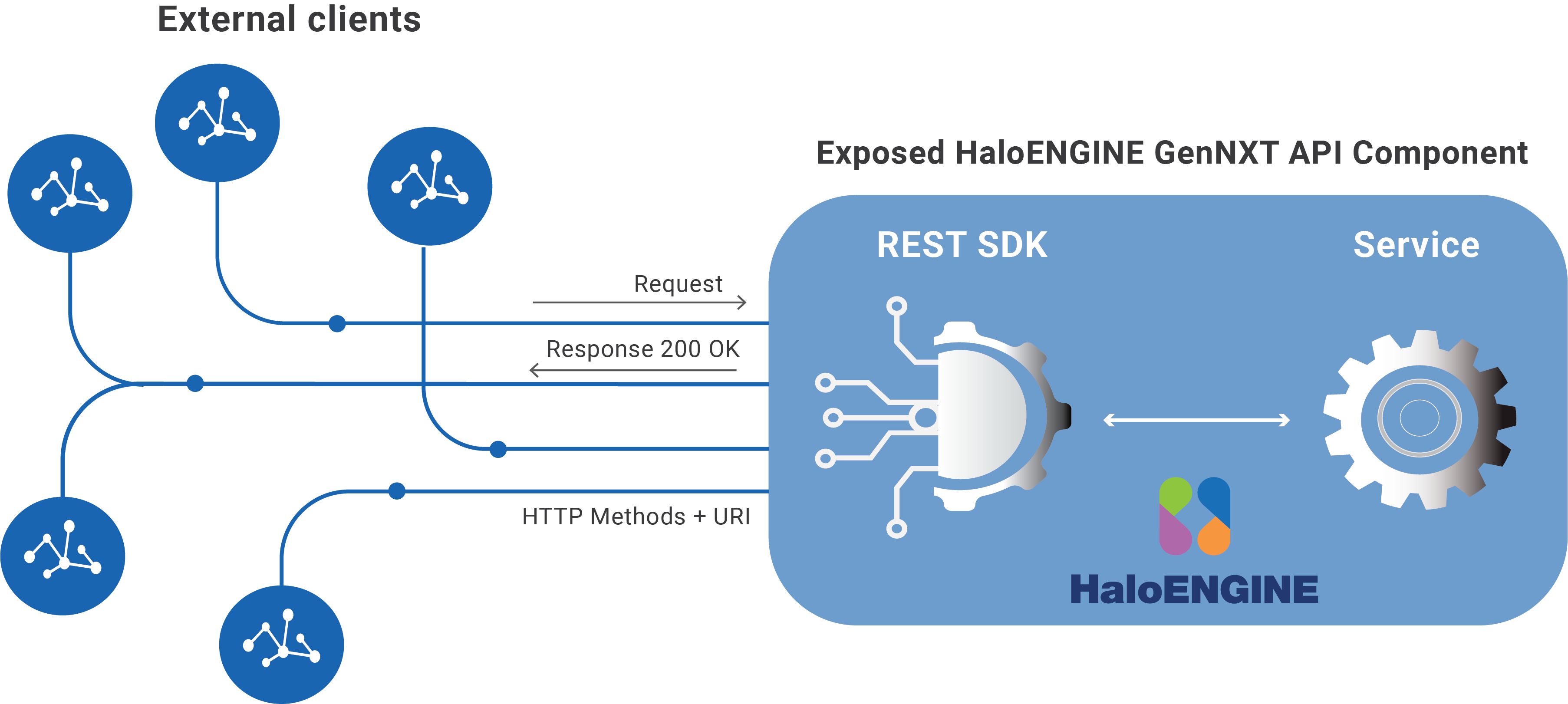
HaloENGINE GenNXT API
The use of this information and the implementation of any APIs described herein are the sole responsibility of the customer. Successful integration depends on the customer’s ability to evaluate, configure, and incorporate the APIs within their business environment.
This chapter demonstrates how to successfully call the HaloENGINE GenNXT API from your application and use it for your business needs. It assumes you are familiar with REST API calls. It provides a clear and comprehensive background to the REST SDK, including endpoints, parameters, response types, and any other information that developers should be aware of. It also explains how the resources work and provides examples that should help you get started.
Please note that the examples in this document are intended solely as guidance and should not be applied in a production environment.
Quick Start
The following high-level steps describe how to get started with HaloENGINE GenNXT and expose the APIs.
-
Step 1: Install HaloENGINE GenNXT as described in the following chapter, “Installing the HaloENGINE GenNXT”.
-
Step 2: Import the license with HaloENGINE_API client enabled.
-
Step 3: Configure HaloENGINE GenNXT for the HaloENGINE_API client type. For more information, refer to the chapter “Configuring HaloENGINE GenNXT”.
-
Step 4: Ensure that an authentication approach is selected for HaloENGINE GenNXT and HaloENGINE_API: Self-Signed Certificate or CA-Signed Certificate.
-
For a Self-Signed Certificate, export the public key of the HaloENGINE GenNXT server's self-signed certificate and install it in Trusted Root Certification Authorities on the client system.
-
For a CA-signed certificate, install the Root CA certificate in Trusted Root Certification Authorities on the client system. If an intermediate CA is used, ensure that the intermediate CA certificate is also available on the client system to validate the certificate chain.
-
API Reference
This section provides API examples that can be executed using Postman.
Host/Base URL
|
Base URL |
|
|
Endpoint description |
|
Base URL
Using the above URL, the "halosdk" API is accessible.
The following variables should be replaced with values for your system.
-
{
server} corresponds to the server's name or IP address. -
{
port} is the port number on which the server runs.
Resource Methods Description
Typically, an API will have multiple endpoints associated with the same resource. Every resource is exposed via a URL. You can obtain the URL of every resource by obtaining access to the API Root Endpoint.
|
Method |
URL |
|---|---|
|
GET |
|
|
POST |
|
|
POST |
|
|
POST |
|
|
POST |
|
|
POST |
|
Endpoints
Version
Description: Retrieves the current HaloENGINE GenNXT package version.
Request method: GET
Request Example
Request URL
GET https://10.91.0.170:8746/haloengine-server/halosdk/Version
Response
A successful request returns the following information:
-
Status Code: 200
-
Response Body: Plain text containing the HaloENGINE GenNXT version number.
1.0.7.0
Get Metadata List
Description: Retrieves the metadata list configured on the HaloENGINE GenNXT Admin Portal in your environment.
Request method: POST
Request Example
Request URL
POST https://10.91.0.170:8746/haloengine-server/halosdk/getmetadatalist
Prerequisites:
-
The HaloENGINE_API client type does not have any built-in metadata. Create the required metadata using Metadata Configuration. For example,
user_group,work_in_progress,folder,review,release,file_name,user_name,file_type, andprojectare sample metadata, as shown in the following image. -
Ensure that classification rules are created for the HaloENGINE_API client type.
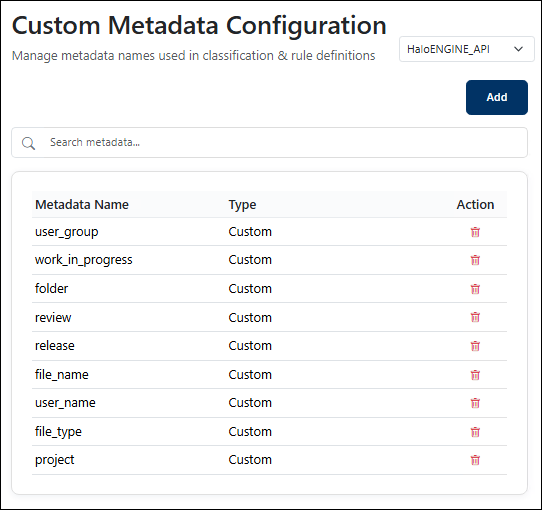
Custom metadata added for HaloENGINE_API
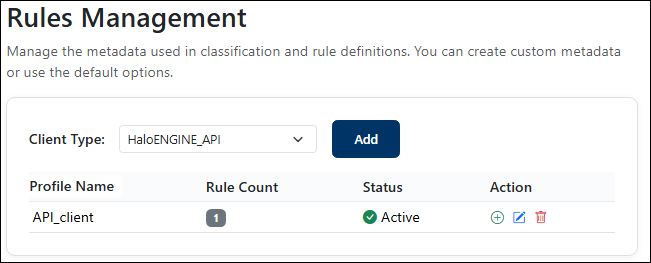
Rules for API client
Request
The request is sent in the Body-JSON format with the following parameters.
-
profileName – Specifies the profile name used by HaloENGINE GenNXT.
-
clientType – Specifies the type of client system.
Example
{
    "clientType": "HaloENGINE_API"
}
Response
A successful request returns the following information:
-
Status Code: 200
-
Response Body: Plain text containing the configured metadata [
file_name, file_type, folder, project, release, review, user_group, user_name, work_in_progress].
Get Action
Description: Determines the action to apply to the file.
Request method: POST
Request Example
Request URL
POST https://10.91.0.170:8746/haloengine-server/halosdk/getaction
Request
The request is sent in the Body-JSON format with the following parameters.
Prerequisite: Ensure that classification rules are created for the HaloENGINE_API client type.
Note: Owner Configuration provides three options: Service (default), Static Email, and User. For Static Email, enter the user's email address in the Admin Portal. For information about configuring owner settings, see Configure Owner Rights.
-
profileName – Specifies the profile name used by HaloENGINE GenNXT.
-
clientType – Specifies the type of client system.
-
Example values
file_type,user_group, andproject.
Example
{
  "customerIdentification": {
    "profileName": "API_client",
    "clientType": "HaloENGINE_API"
  },
  "metadata": {
    "simpleValue": {
      "file_type": [
        "*"
      ],
      "user_group": [
        "finance"
      ],
      "project": [
        "project_steer"
      ]
    }
  }
}
Response
A successful request returns the following information:
-
Status Code: 200
-
Response Body: A successful request returns a JSON response with the following structure:
{
    "action": {
        "value": [
            "AUDIT",
            "LABEL"
        ]
    },
    "authorMode": {
        "userEmailNeeded": false,
        "staticEmail": null
    },
    "template": {
        "id": "7afc9a97-cefc-4ae1-9a45-ea9acfed9f8c",
        "name": "HCAD Confidential",
        "active": true,
        "isActive": true
    },
    "returnMessage": {
        "success": true,
        "message": "Action rules found for this profile"
    }
}
The response varies based on the Owner Configuration setting:
-
Service →
"userEmailNeeded": false,"staticEmail": null -
Static email →
"userEmailNeeded": false,"staticEmail": "john@halosecude.onmicrosoft.com" -
User →
"userEmailNeeded": true,"staticEmail": null
Encrypt File
Description: Executes the encrypt action.
Request method: POST
Request Example
Request URL
POST https://10.91.0.170:8746/haloengine-server/halosdk/encryptfile
Request
The request is sent in the Body-JSON format with the following parameters.
Key: file (File as Type).
Description: Browse and select the file to be labeled. For example: BOM.txt
Example
BOM.txt
Key (Optional): authorEmailId (Text as Type)
Description: Email address of the document owner. Note: When an email address is provided, the user is assigned owner permissions. If no email address is provided, the service principal ID is assigned as the owner.
Example
john@halosecude.onmicrosoft.com
Key: labelId (Text as Type)
Description: GUID of the label template.
Example
99f1473d-74f4-47ca-9843-e735f94fa797
Key: type (Text as Type).
Description: Labeling type. Supported values:
-
LABELING
-
COMPOUNDFILELABELING
Example
LABELING
Key: additionalParam (Text as Type).
Description: Required when the COMPOUNDFILELABELING type is used. Provide the compound file details in JSON format.
Example
{"compoundid":"compound123"}
Response
A successful request returns the following information:
-
Status Code: 200
-
Response Body: A successful request returns a JSON response with the following structure:
{
    "success": true,
    "message": "File encrypted successfully",
    "fileName": "BOM.ptxt",
    "fileType": "ptxt",
    "content": "The encrypted content is displayed."
}
Decrypt File
Description: Decrypts an encrypted file.
Request method: POST
Request Example
Request URL
POST https://10.91.0.170:8746/haloengine-server/halosdk/decryptfile
Request
The request is sent in the Body-JSON format with the following parameters.
Key: file (File as Type).
Description: Browse and select the file to be decrypted.
Example
BOM.rtf.pfile
Response
A successful request returns the following information:
-
Status Code: 200
-
Response Body: A successful request returns a JSON response with the following structure:
{
    "success": true,
    "message": "File decrypted successfully",
    "fileName": "BOM.rtf",
    "fileType": "rtf",
    "content": "The decrypted content is displayed."
    "templateID": "99f1473d-74f4-47ca-9843-e735f94fa797"

}
Send PLM Monitor Log Data
Description: Sends audit log to the Admin Portal.
Request method: POST
Request Example
Request URL
POST https://10.91.0.170:8746/haloengine-server/halosdk/sendmonitorlog
Request
The request is sent in the Body-JSON format with the following parameters.
-
profileName – Specifies the profile name used by HaloENGINE GenNXT.
-
clientType – Specifies the type of client system.
The request body may also include additional fields, such as:
-
logInfo – Details about the log event.
-
userInfo – Information about the user who triggered the event.
-
resultedDecision – Final decision returned by HaloENGINE GenNXT.
Example
{
    "identification": {
    "profileName": "API_client",
    "clientType": "HaloENGINE_API"
     },
	"logInfo":{
        "datetime":"30/01/2026",
        "timeZone":123123,
        "logID":"FinTEAM"
    },
    "userInfo":{
        "userName":"John",
        "userType":"Employee",
        "userEmail":"john.smith@tservice.com"
    },
    "resultedDecision":{
        "fileBlocked":false,
        "fileLabeled":true,
        "fileProtected":true,
        "unprotected":false,
        "unlabeled":false,
        "fileBlockedByRule":"",
        "policyName":"HCAD Secret",
        "policyId":"99f1473d-74f4-47ca-9843-e735f94fa797",
        "classification":{
            "byUser":"user",
            "bySystem":"server00045"
        },
        "abortedBySystem":false,
        "abortedByUser":false,
        "error":false,
        "simMode":false,
        "extendedTags":[]
    },
    "plmContextInfo":{
        "eventType":"Test",
        "preProcessInfo":[],
        "attributes":[],
        "documentId":"PurchaseOrder.pdf",
        "documentNumber":"0nu74rf",
        "documentType":"pdf",
        "documentPart":"prt",
        "documentVersion":"1.9",
        "viewOnly":"false",
        "dmsProcess":"false",
        "browserClient":"false"
    },
    "plmDestInfo":{
        "destinationAttributes":[],
        "browser":"Chrome",
        "hostname":"localhost",
        "ipaddress":"localhost",
        "operatingSystem":"Windows"
    }
}
Response
A successful request returns the following information:
-
Status Code: 200
-
Response Body: The response body returns the boolean value true, represented as plain text.
Error Handling
Although the API returns 200 OK, the response may contain an application-level error when the request cannot be processed successfully.
|
Sample Message |
Description |
|---|---|
|
|
The specified |
|
|
The specified |
|
|
No valid action rules are configured for the specified profile. |
Error Codes