
Introduction
HaloENGINE GenNXT is a Java-based classification engine that integrates with Microsoft Purview Information Protection (MPIP) to retrieve sensitivity labels for configuration in the Admin Portal. It evaluates file metadata against the configured classification rules and determines the applicable action and sensitivity label.
HaloENGINE GenNXT integrates with client applications to evaluate file metadata against the configured classification rules during the download process and determine the applicable action and sensitivity label. The client application uses the information returned by HaloENGINE GenNXT to perform the required file-processing action.
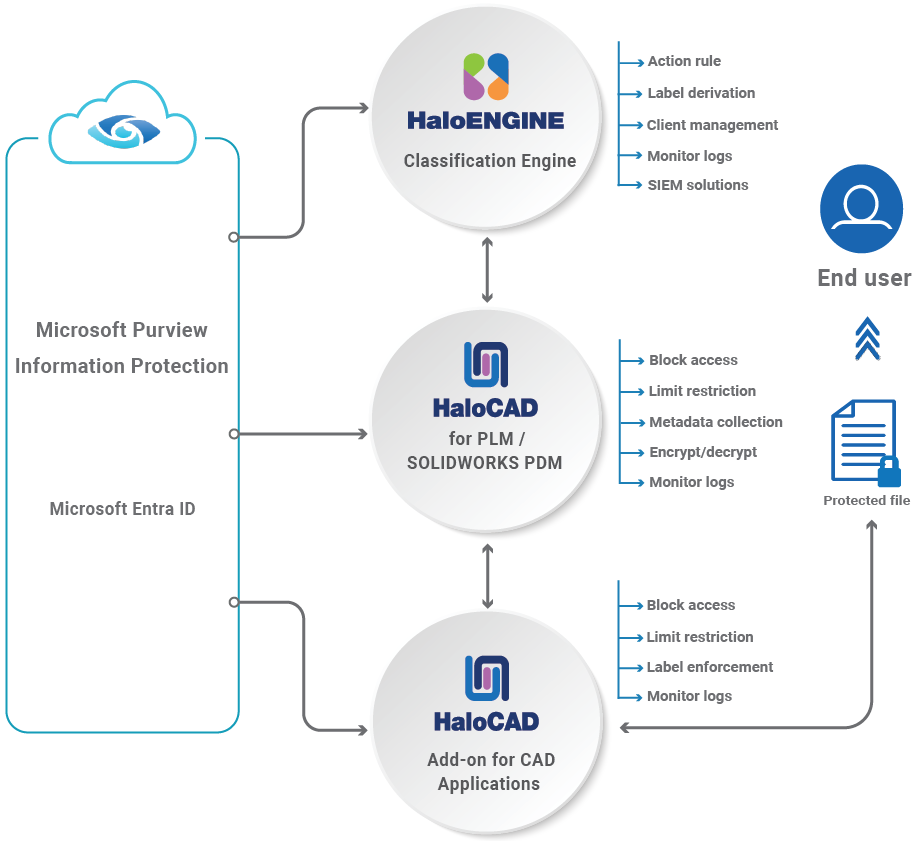
HaloENGINE GenNXT integrated with HaloCAD for PLM/PDM solution
HaloENGINE GenNXT Features
-
Business rule processing – Evaluates configured rules and determines the appropriate action for each file.
-
Monitor logging – Records all file upload and download activities, regardless of whether the files are protected.
-
SIEM integration – Forwards audit events to a Security Information and Event Management (SIEM) platform.
-
Dashboard – Provides a centralized view of file activity, including data movement through upload and download operations.
About this Manual
This manual describes the installation and configuration of the following components:
-
HaloENGINE GenNXT
-
HaloENGINE GenNXT API
Terminology
This section defines the key terms used throughout this manual. Familiarity with these terms will help you understand the concepts, procedures, and components described in the subsequent sections.
|
Term |
Recommended Description |
|---|---|
|
HaloENGINE GenNXT |
Evaluates file metadata against configured classification rules and determines the applicable action and classification property. |
|
HaloENGINE GenNXT Tomcat Service |
A Windows service used by HaloENGINE GenNXT and HaloCAD components. |
|
HaloENGINE GenNXT Admin Portal |
The web-based administration interface used to configure classification schemas, profiles, rules, labels, monitoring, and system settings. |
|
MPIP |
Microsoft Purview Information Protection, Microsoft's information protection platform used to classify and protect files with sensitivity labels. |
|
Sensitivity Label |
A Microsoft Purview label that classifies content and applies protection settings, such as encryption and usage rights. |
|
Classification Schema |
Defines the classification properties and their values used to categorize an organization’s data. |
|
Property Name |
Specifies the name of a classification property used to categorize an organization’s data. This manual uses Public, Internal, Confidential, and Secret as example property names. You can define property names according to your organization’s classification requirements. |
|
Default Property |
Defines the classification property applied when no classification rule matches. |
|
Profile Name |
Specifies the name of a profile that stores classification settings, schemas, and rules for a specific client. |
|
Client Type |
Identifies the type of client integrated with HaloENGINE GenNXT, such as Windchill, Teamcenter, Autodesk Vault, SOLIDWORKS PDM, or HaloENGINE_API. |
|
Metadata |
Information or properties associated with a file that can be used to evaluate a classification rule. |
|
Pre-Expression |
Defines a group of related metadata values used to evaluate a classification rule. |
|
Classification Rule |
A configurable rule that evaluates file metadata and determines the action to perform, such as Block or Label. |
|
Condition |
Specifies how the selected metadata is compared with the specified value. |
|
Action |
Specifies how HaloENGINE GenNXT processes the file when the rule conditions are met. The available actions are Block and Label. |
|
Monitor |
Records file upload and download activities without modifying the file. |
|
Block |
Prevents file upload or download based on the configured classification rule. |
|
Label |
Applies the selected MPIP sensitivity label to classify and protect the file according to the configured rule. |
|
Fail-Safe Mode |
Defines how file downloads are handled when an error occurs during file processing. |
|
SIEM |
A Security Information and Event Management solution used to collect, analyze, and monitor security events. |