
Reference Manuals
The table below describes where to find information for each step.
|
Component |
Refer to |
|---|---|
|
Step 1 – Install and configure HaloENGINE GenNXT |
Refer to this manual. |
|
Step 2 – Install HaloCAD for PLM/PDM |
Refer to the corresponding HaloCAD for PLM/PDM Installation Manual. |
|
Steps 3 and 4 – Protection and decryption workflow |
Refer to the corresponding HaloCAD for PLM/PDM Operations Manual. |
Reference Manuals
How it Works
HaloENGINE GenNXT supports multiple client types, including Windchill, Teamcenter, Autodesk Vault, and SOLIDWORKS PDM. The following steps illustrate the workflow between HaloCAD for PLM and HaloENGINE GenNXT.
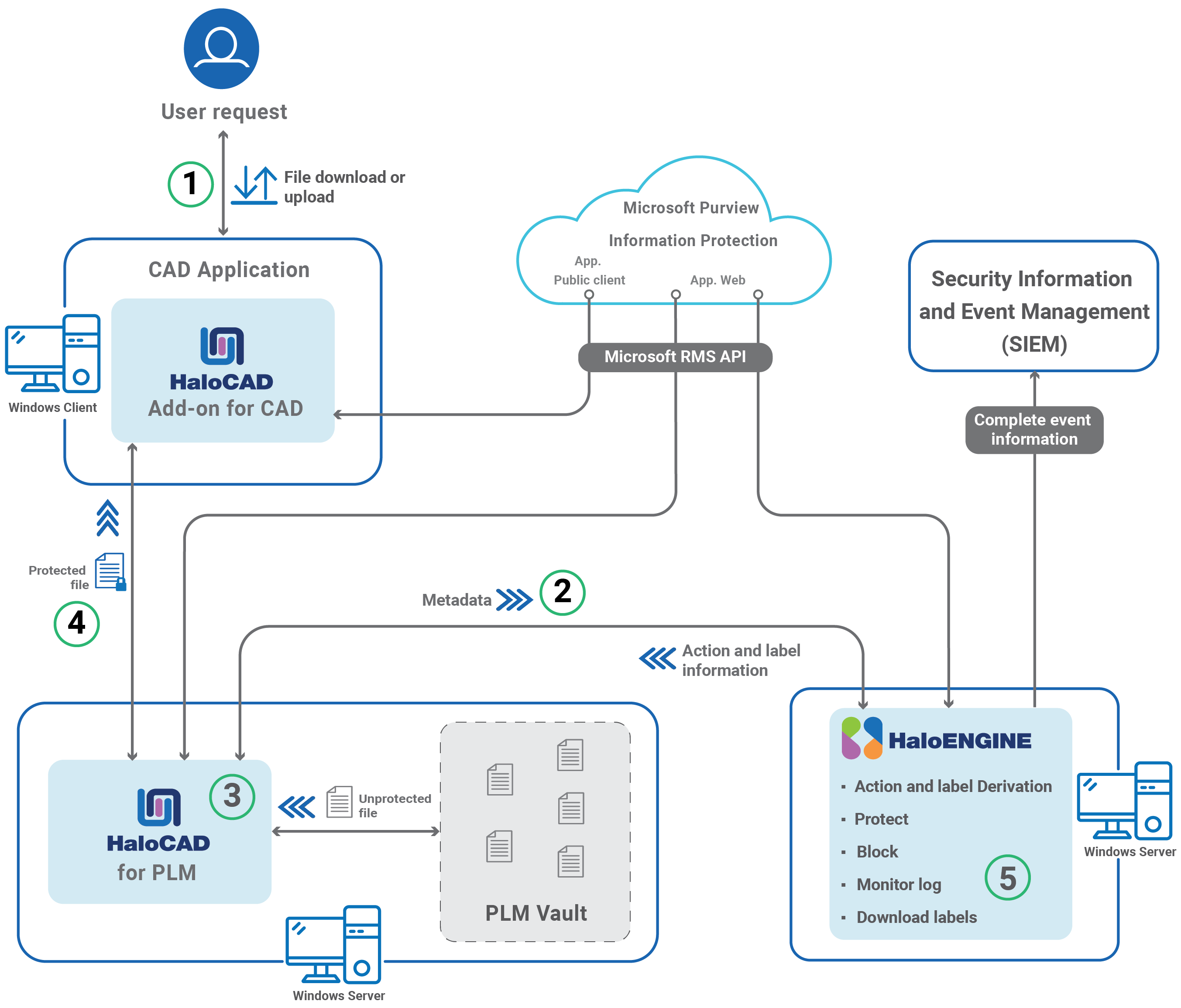
Integration Workflow: HaloENGINE GenNXT and Client Applications
-
The user performs a check-out (download) or check-in (upload) operation. For SOLIDWORKS PDM, the user performs a copy or move operation.
-
HaloCAD for PLM retrieves the selected file and its associated metadata.
-
HaloCAD for PLM sends the metadata to HaloENGINE GenNXT.
-
HaloENGINE GenNXT identifies the client type and profile name and evaluates the configured classification and action rules.
-
HaloENGINE GenNXT returns the appropriate action and sensitivity label to HaloCAD for PLM.
-
-
HaloCAD for PLM processes the file based on the returned action and configured policies.
-
If no applicable action rule is configured, the file is downloaded without protection in Fail-Safe (Tolerant) mode.
-
During check-out, HaloCAD for PLM applies the appropriate MPIP sensitivity label and protection to the file.
-
During check-in, HaloCAD for PLM removes the applied protection before storing the file in the PLM repository.
-
If a Block action is configured, HaloCAD for PLM prevents the file from being downloaded.
-
-
HaloCAD for PLM returns the processed file to the user.
-
HaloCAD for PLM records the operation details and forwards them to the HaloENGINE GenNXT Monitor log for auditing.
Note: For the HaloCAD for PDM workflow, refer to the corresponding HaloCAD for PDM Operations Manual. The PDM workflow differs from the PLM workflow.