
This section provides supplemental information.
Supported FMS Configurations
Teamcenter supports various FMS configurations based on the volume of files to be stored, how often files are accessed by clients, and client geographical location (remote).
The following FMS configurations are supported:
-
Single FSC
-
With single volume – Typically for simple deployment. Teamcenter provides a single FSC that mounts a single volume. In this case, enter the URL in the "FMS Target URL".
-
With multiple volumes – A standard small or medium deployment with a large volume of file storage. In this case, each volume has an entry under this FSC. Here, enter the URL in the "FMS Target URL" field.
-
A sample of the FMS master file is shown below for illustration purposes:
<fscgroup id="mygroup">
<loadbalancer id="ReverseProxy" address="http://SAMPLE.local:8080/tc/fms" />
<fsc id="FSC_SAMPLE_Teamcenter_3" address="http://SAMPLE.local:4544" ismaster="true">
<volume id="9c1cfc281ec644eabec6" enterpriseid="-1234567890" root="C:\Program Files\Siemens\volume" priority="0" />
<transientvolume id="v6ca776c74e437d98ef662ecb5751tt" enterpriseid="-1234567890" root="C:\\Temp\\transientVolume_Teamcenter" />
</fsc>
-
-
Multiple FSCs with Multiple Volumes – Numerous files are accessed simultaneously by the clients from more than one FSC or a single file from any one of the configured FSC. For instance, in the below case, a client is configured to connect with more than one FSC. Therefore, you must specify the details in the Other Target URL field.
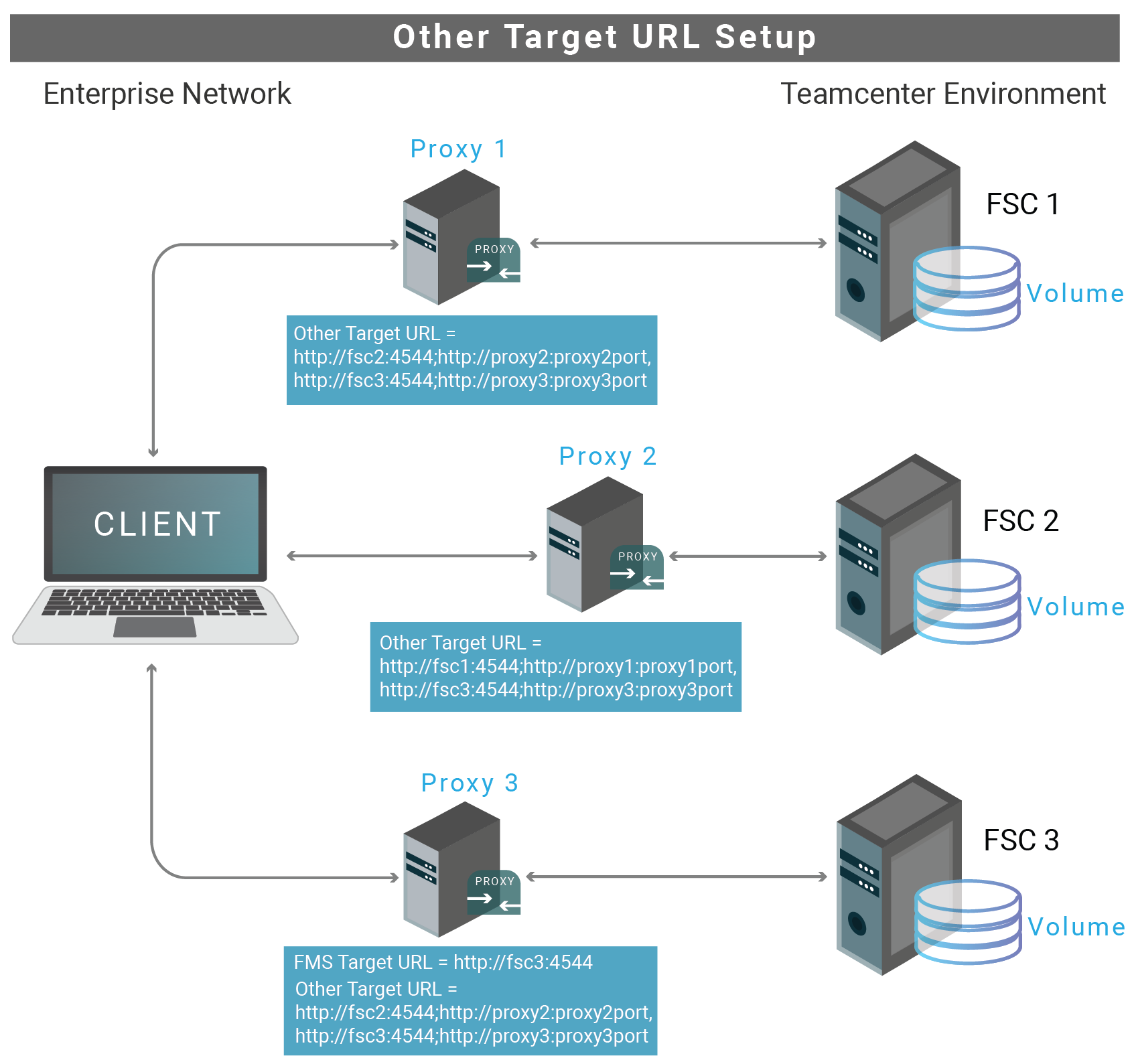
Other Target URL Setup
A sample of the FMS master file is shown below for illustration purposes:
<fscgroup id="mygroup">
<loadbalancer id="ReverseProxy" address="http://PUN-FMS:8080/tc/fms"/>
<fsc id="PUN-FMS_usprd01" address="http://PUN-FMS:4544" ismaster="true">
<volume id="123d0000000f8c9bd0d7" enterpriseid="-1234567890" root="E:\Siemens\usprd01_vols\dba_vol1" priority="0" />
<volume id="456a000001388c9bd0d7" enterpriseid="-1234567890" root="E:\Siemens\usprd01_vols\lyn_vol1" priority="0" />
<volume id="7898001339268c9bd0d7" enterpriseid="-1234567890" root="F:\Siemens\usprd01_vols\dba_vol2" priority="0" />
<volume id="0123001339268c9bd0d7" enterpriseid="-1234567890" root="F:\Siemens\usprd01_vols\lyn_vol2" priority="0" />
<transientvolume id="7f16bd0578697f1eb1bbb4b5020aadef" enterpriseid="-1234567890" root="D:\\Temp\\transientVolume_usprd01" priority="0" />
</fsc>
<fsc id="PUN-FMS_YUN_WEB20P_usprd01" address="http://PUN-FMS-WEB:4544" ismaster="false">
<transientvolume id="8c425ee7352a4657ac777dc198712cb3" enterpriseid="-1234567890" root="D:\\Temp\\transientVolume_usprd01" priority="0" />
</fsc>
<fsc id="PUN-FMS_YUT_usprd01" address="http://PUN-FMS-YUT:4544" ismaster="true">
<volume id="c07e4bfa95a44a0894b0" enterpriseid="-1234567890" root="D:\Siemens\usprd01_vols\YUT_vol1" priority="0" />
</fsc>
<fsc id="PUN-FMS_YRT_usprd01" address="http://PUN-FMS-YRT:4544" ismaster="true">
<volume id="9c1cfc281ec644eabec6" enterpriseid="-1234567890" root="D:\Siemens\usprd01_vols\YRT_vol1" priority="0" />
</fsc>
<clientmap subnet="127.0.0.1" mask="0.0.0.0">
<assignedfsc fscid="PUN-FMS_YUN_WEB20P_usprd01" priority="0" />
</clientmap>
</fscgroup>
Failover Mechanism for HaloENGINE GenNXT in HaloCAD for PLM
Server failover between two systems supports uninterrupted operation and service reliability in the event of a failure. The server failover configuration is active-standby, where the primary server is active, and the secondary server is standby.
HaloCAD for PLM supports connection failover between two HaloENGINE GenNXT instances. The failover mechanism provides the following benefits:
-
High Availability: If the primary HaloENGINE GenNXT fails, the secondary HaloENGINE GenNXT takes over, reducing downtime and maintaining continuous operation.
Example: Assume that your business process requires no downtime.
As part of the business security policy, the administrator configures Fail-Safe Mode as Strict to block file uploads or downloads whenever an error occurs. If HaloENGINE GenNXT encounters an unexpected issue and fails to obtain label information, file uploads or downloads are prevented. In such cases, the HaloENGINE GenNXT failover mechanism handles the situation without affecting the end user. If the primary HaloENGINE GenNXT connection fails, HaloCAD detects the failure and immediately switches to the secondary HaloENGINE GenNXT to continue providing services.
Once the primary HaloENGINE GenNXT is restored, it remains in standby while the secondary HaloENGINE GenNXT remains active. If the secondary HaloENGINE GenNXT fails, the primary HaloENGINE GenNXT takes over operations again.
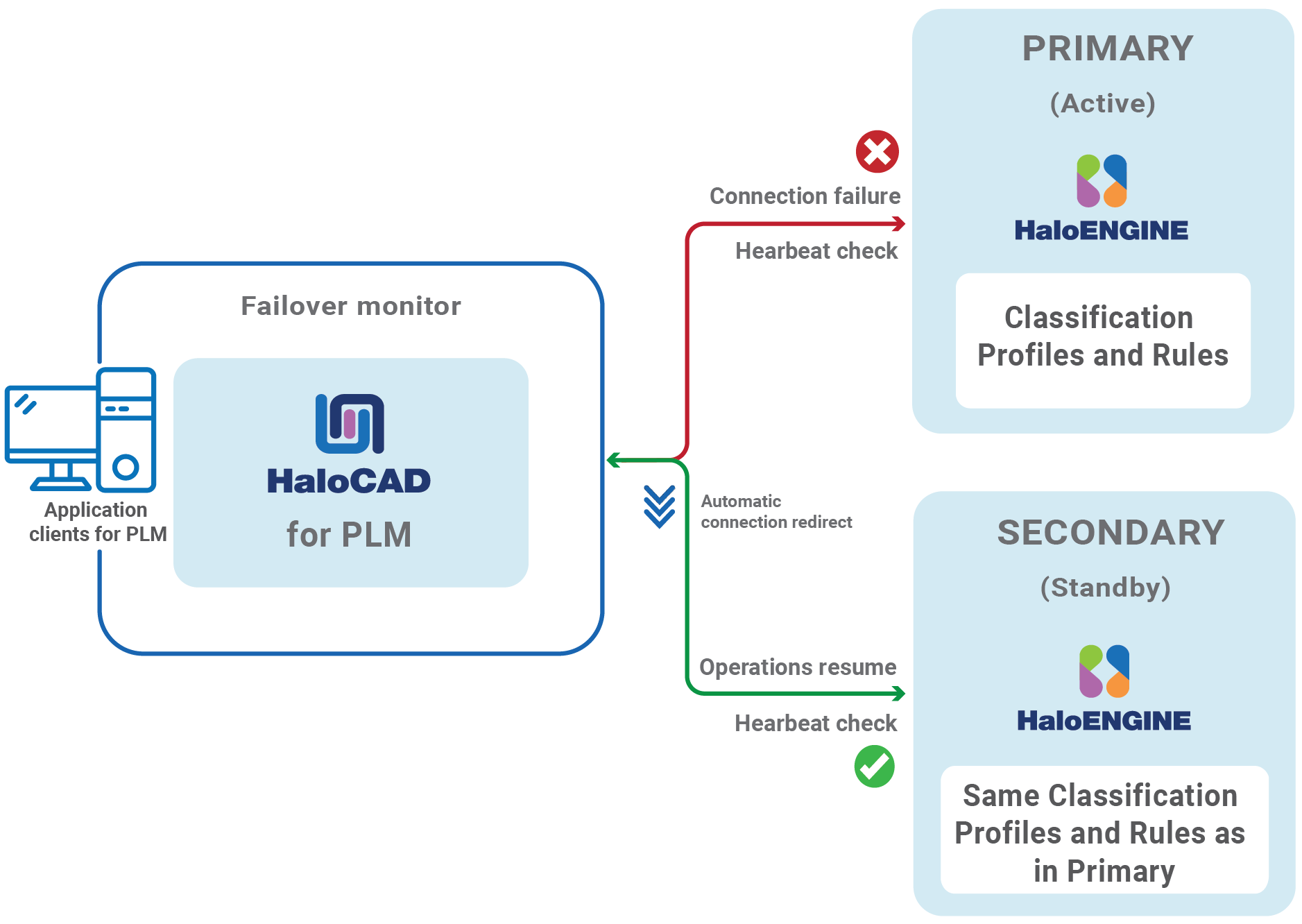
Failover Mechanism for HaloENGINE GenNXT in HaloCAD for PLM
-
Redundancy: Provides redundancy by ensuring that another HaloENGINE GenNXT is always available to take over if the primary HaloENGINE GenNXT fails. This minimizes the possibility of a single point of failure.
-
Data Integrity and Consistency: In the event of a failure, the failover mechanism helps ensure that data remains consistent and that file upload and download activities are not lost. This is crucial for systems that rely on high data security.
Failover Mechanism Requirement
-
Network Infrastructure: Deploy the secondary HaloENGINE GenNXT on a separate network segment from the primary HaloENGINE GenNXT.
-
Data Replication: Ensure that both HaloENGINE GenNXT use the same classification profiles and rules.
Third-Party Libraries
Third-party software/code is included or bundled with Secude's products according to its appropriate license. Secude conducts testing to make sure the third-party products are compatible with and perform as intended with Secude applications.
The third-party libraries and dependencies used by HaloCAD for Teamcenter are shown in the table below.
Third-party libraries
Teamcenter Metadata Definitions
The table below lists the Teamcenter metadata available in the HaloENGINE GenNXT.
|
Teamcenter metadata |
Use |
|---|---|
|
user_role |
Derivation from the user role. Multiple roles may be assigned to a single user. (For example, Designer and Engineer) |
|
user_def_group |
Derivation from a group of users who log in. (For example, a user from the Engineering group) |
|
gov_clearance |
Derivation from a specific object based on value or licensing value. (For example, secret - single value field) |
|
ip_clearance |
Derivation from intellectual property (IP) classification values and clearance levels assigned to data objects and users for IP access evaluation. (For example, super-secret - single value field) |
|
user_name |
Derivation from Teamcenter logged-in users. (For example, John and Derek) |
|
file_type |
Derivation from file type and Teamcenter object data. (NX file types and MS Office native file types) (For example, prt, asm, and XLSX) |
|
gov_classification |
Derivation from a Teamcenter object based on its value or license value. (For example, secret - single value field) |
|
obj_project_names |
Derivation from Teamcenter object data. The object could be used in several projects. (For example, project1; project2- multi-value- field) |
|
ip_classification |
Derivation from Teamcenter's intellectual property (IP). (For example, secret, internal, and confidential - single value field) |
|
preexpression_custom_pre-expression |
Derivation from custom pre-expression.
|
Teamcenter metadata
Deactivating the HaloCAD for Teamcenter
For any diagnostic testing purposes in connection with HaloCAD, you may need to deactivate HaloCAD for a while. In such cases, follow the procedure below:
-
Step 1. Stop fsc service.
Remove the changes done in FMS master file
fmsmaster_FSC_<ComputerName>_Teamcenter.xmlFor example,
<loadbalancer id="ReverseProxy" address="http://tclu0310.Secude.local:8080/tc/fms/" /> -
Step 2. Remove the changes made in the FCC file.
-
Go to
<installed_path>\Teamcenter12\tccs\bin>, and execute CMD with administrator privilege. -
Type
fccstat.exe -stopand press Enter. -
Remove the changes on the line in the
fcc.xmlfile. -
FCC Line format:
<parentfsc address="http://:/tc/fms" priority="0" transport="lan"/> <assignment address="parentfsc address"> -
Alternatively, you can use the backup files of these two.
-
-
Step 3. Start fsc service.
-
Type
fccstat.exe -startand press Enter. -
Type
fccstat.exe -statusand press Enter. You receive a confirmation message without the Haloproxy port number, indicating that HaloCAD is not active.
-
-
Step 4. Remove the two system variables - Default_Transient_Server and Fms_BootStrap_Urls.
-
Step 5. Restart Server Manager from
services.msc. -
Complete your investigation, then activate it as described in the section “TCCS Configuration - Step 2”.
Uninstalling the HaloCAD for Teamcenter
Once you stop using the HaloCAD component, you can uninstall it. Uninstalling removes all files and registry settings that were added to your computer during initial installation.
Prerequisites:
-
Close the Configuration Tool before uninstalling the application. If the tool is running, the uninstallation displays the following error message: "Kindly close the running config tool and proceed uninstallation!"
-
Revert the AWC SSO proxy URL redirection changes in the
IdentityService.xmlfile before uninstalling the application.
Method #1
-
Click the Start menu > go to Control Panel > Programs > Programs and Features > Uninstall a Program > select HaloCAD for Teamcenter application from the list > right-click and select the Uninstall option or double-click on the installer
HaloCAD_Teamcenter_Setup.exefile. -
Depending on your Windows security settings, you may get a security warning as "Do you want to allow the following program to make changes to this computer?". If this warning appears, click the Yes button to confirm that you want to uninstall the HaloCAD component.
-
The following confirmation message appears.
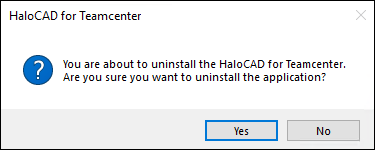
Uninstall Message #1
-
Click Yes to confirm that you want to remove it from the computer.
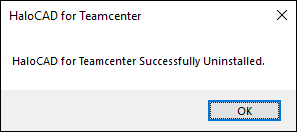
Uninstall Message #2
Result
-
The HaloCAD component is successfully uninstalled.
-
Click OK to close the dialog.
-
The uninstallation process is complete.
-
Alternative method: Open Command Prompt as Administrator, then run this command:
HaloCAD_Teamcenter_Setup.exe -uninstall
-