
This section contains supplementary information.
Uninstalling the HaloENGINE
Before uninstalling, ensure that you export the current configuration. The exported configuration file can be imported during reinstallation to retain existing settings, reduce configuration effort, and minimize the risk of misconfigurations or errors.
Method #1
When you no longer use the service, you may uninstall the application. Uninstalling removes all files and registry settings that were added to your computer during the initial installation.
-
Click Start menu > go to Control Panel > Programs > Programs and Features > Uninstall a Program > select HaloENGINE application from the list > right-click and select Uninstall option or double-click on the installer
HaloENGINE_Setup.exe. -
Depending on your Windows security settings, you may get a security warning as "Do you want to allow the following program to make changes to this computer?". If you get this security warning, click the Yes button to confirm that you want to uninstall the application.
-
The following confirmation message appears:
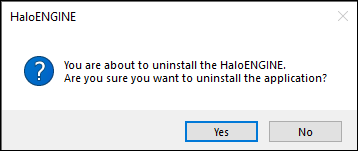
Uninstall message #1
-
Click Yes to confirm that you want to remove it from the computer.
-
You will be prompted to save a backup of the configuration files.
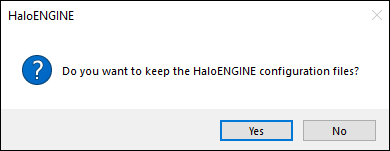
Uninstall message #2
-
Click Yes to save and continue with the uninstallation (The previous configuration files will be kept in the same location) or choose No to proceed with the uninstallation without saving.
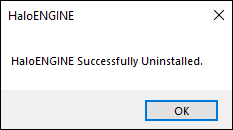
Uninstall message #3
-
Click OK to close the message.
Method #2
The application can be removed using the command line, as illustrated in the sample below.
-
Open a command prompt.
-
Navigate to the application installer's directory.
-
Use the following commands to uninstall:
Example #1: uninstall and keep the configuration files
HaloENGINE_Setup.exe -uninstall -keepconfig true
Example #2: uninstall and delete the configuration files
HaloENGINE_Setup.exe -uninstall -keepconfig false
Metadata Definition
The following section provides a table of built-in metadata for PLM and PDM clients.
Windchill
The table below lists the Windchill metadata available in the HaloENGINE.
|
Windchill metadata |
Use |
|---|---|
|
server_name |
Derivation from server name (FQDN of the Windchill server). (For example, |
|
user_name |
Derivation from Windchill logged-in users. (For example, John and Derek) |
|
file_name |
Derivation from the file name. |
|
project_name |
Derivation from the project name. (For example, Windchill) |
|
product_name |
Derivation from product name (For example, Windchill). |
|
lifecycle_template |
Derivation from the lifecycle of a file. Lifecycle provides an overview of how business items develop and serves as a model for the commercialization process. The lifecycle templates may be of the following types: Approval, Basic, Default, and so on. (For example, |
|
user_role |
Derivation from the user role. (For example, Designer and Engineer) |
|
lifecycle_state |
Derivation from the lifecycle of a file. Each phase of a lifecycle template is associated with a lifecycle state. There are different kinds of lifecycle states.
(For example, |
|
security_label |
Derivation from Windchill access control policy. For more details, please refer to the online PTC Windchill documentation. (For example, Export Control, Corporate Proprietary, and Third Party Proprietary) |
|
file_type |
Derivation from file type (Creo file types and MS Office native file types). (For example, sec, prt, asm, xlsx) |
|
library_name |
Derivation from the library name. (For example, Density, Wheel, and Pipeline) |
|
workspace_name |
Derivation from workspace. (For example, Generic_computer and Drive System) |
|
system_context |
Derivation from the origin of the data. (For example, Generic_computer, and Drive System) |
|
preexpression_custom_pre-expression |
Derivation from custom pre-expression.
|
Windchill metadata
Teamcenter
The table below lists the Teamcenter metadata available in the HaloENGINE.
|
Teamcenter metadata |
Use |
|---|---|
|
user_role |
Derivation from the user role. Multiple roles may be assigned to a single user. (For example, Designer and Engineer) |
|
user_def_group |
Derivation from a group of users who log in. (For example, a user from the Engineering group) |
|
gov_clearance |
Derivation from a specific object based on value or licensing value. (For example, secret - single value field) |
|
ip_clearance |
Derivation from intellectual property (IP) classification values and clearance levels assigned to data objects and users for IP access evaluation. (For example, super-secret - single value field) |
|
user_name |
Derivation from Teamcenter logged-in users. (For example, John and Derek) |
|
file_type |
Derivation from file type and Teamcenter object data. (NX file types and MS Office native file types) (For example, prt, asm, and XLSX) |
|
gov_classification |
Derivation from a Teamcenter object based on its value or license value. (For example, secret - single value field) |
|
obj_project_names |
Derivation from Teamcenter object data. The object could be used in several projects. (For example, project1; project2- multi-value- field) |
|
ip_classification |
Derivation from Teamcenter's intellectual property (IP). (For example, secret, internal, and confidential - single value field) |
|
preexpression_custom_pre-expression |
Derivation from custom pre-expression.
|
Teamcenter metadata
Autodesk Vault
The table below lists the Autodesk Vault metadata available in the HaloENGINE.
|
Autodesk Vault Metadata |
Use |
|---|---|
|
lifecycle_state |
Derivation from the lifecycle of Autodesk Vault data. (For example, work-in-progress, review, and released) |
|
file_type |
Derivation from file type. File types of AutoCAD, Inventor, and MS Office native file types. (For example, |
|
folder_name |
Derivation from the folder name in the Autodesk Vault server. (For example, |
|
preexpression_custom_pre-expression |
Derivation from custom pre-expression.
|
Autodesk Vault metadata
SOLIDWORKS PDM
The table below lists the SOLIDWORKS PDM metadata available in the HaloENGINE.
|
SOLIDWORKS PDM Metadata |
Use |
|---|---|
|
author_name |
Derivation from the Web2 client interface Items author. |
|
domain_name |
Derivation from the network domain name associated with the current user. (For example, |
|
file_type |
Derivation from file type. File types of SOLIDWORKS. |
|
user_name |
Derivation from machine logged-on user. (For example, John and Derek) |
|
client_hostname |
Derivation from the computer where SOLIDWORKS PDM is installed. (For example, |
|
current_state |
Derivation from the file's status as set in SOLIDWORKS PDM. (For example, Approved and Waiting for approval) |
|
project_name |
The name of the project from which the saved file is derived. (For example, CMS Turbo Engine) |
|
ad_group |
Derivation from the domain groups. (For example, Domain Users and Superusers) |
|
folder_path |
Derivation from folder name in SOLIDWORKS PDM server. (For example, Please note that files cannot be encrypted if the folder name ( |
|
preexpression_custom_pre-expression |
Derivation from custom pre-expression
|
SOLIDWORKS PDM metadata
Third-Party Libraries
Third-party software/code is included or bundled with Secude's products according to its appropriate license. Secude conducts testing to make sure the third-party products are compatible with and perform as intended with Secude applications.
The third-party libraries and dependencies used by HaloENGINE are shown in the table below.
Third-party libraries